AI News · 7 min read
Gemini is calling businesses for customers. What should owners do?
Short answerOn November 17, 2026, Google made Tasks in Gemini free in the US and five other countries, and in the US it can phone businesses for a customer to ask about availability, compare quotes and book appointments. Calls open by saying it is an AI. Meta's Muse started placing similar calls for paid US subscribers on November 12. These callers are real customers doing their shopping by proxy, so most businesses should not hang up on them. Answer every call, give clear prices and openings, and review your Google Business Profile call settings this week.

What did Google announce on November 17?
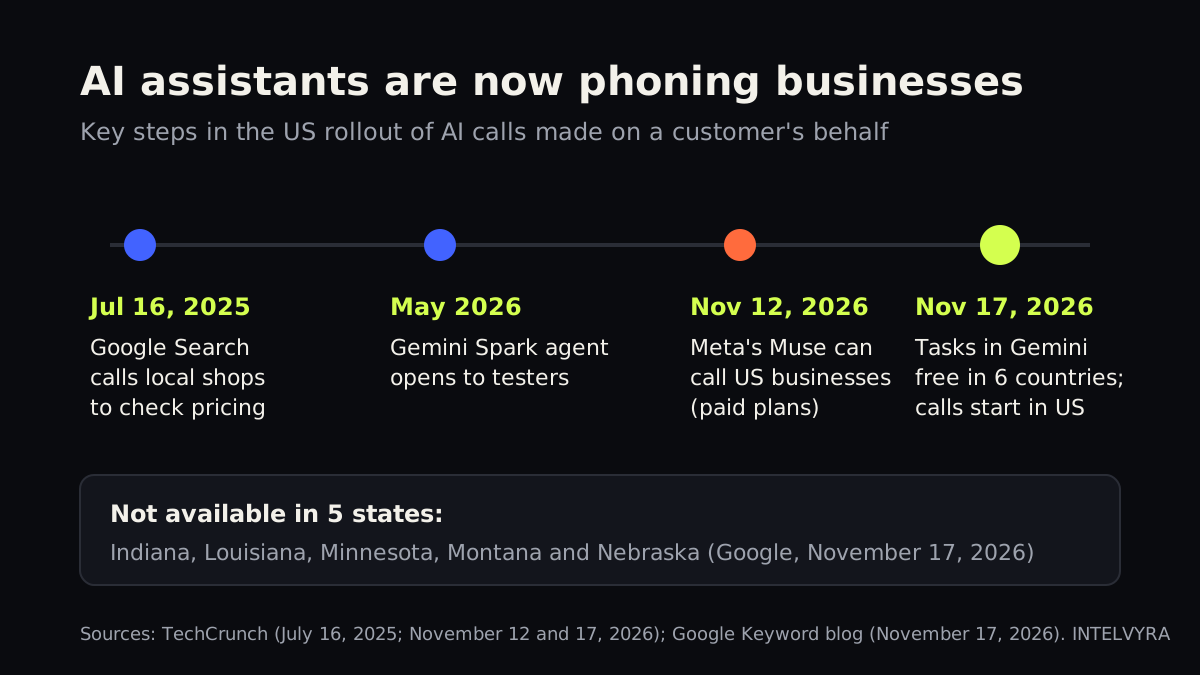
Google made Tasks in Gemini, the agent feature first released in May under the name Spark, free for “hundreds of millions of people” in the US, Japan, Korea, Canada, Australia and India (Google, November 17, 2026). Until now it was limited to paying subscribers: TechCrunch notes it went from select testers to US subscribers of Google's AI Ultra tier before this week's change (TechCrunch, November 17, 2026).
A task is a job you hand off rather than a question you ask. Google's own example matters most for local businesses: Gemini called two nearby car dealerships at once, sat through their hold music, said right away that it was an AI, and booked a service appointment at the shop that took appointments instead of walk-ins only. Google says calling starts in the US and is not available in Indiana, Louisiana, Minnesota, Montana or Nebraska. The same update lets Gemini buy things through Google Pay within a spending cap the user sets, and users must confirm purchases (9to5Google, November 17, 2026).
Google is not alone. Five days earlier, Meta's Muse agent began placing calls to US businesses for paid subscribers, with plans starting at $20 a month (TechCrunch, November 12, 2026). Meta's chief AI officer pitched it for the calls people would rather avoid, such as insurers, cable companies and restaurants without online booking.
What will one of these calls sound like?
Think of the caller as a busy executive's assistant phoning around for a quote. The assistant isn't the one who will sit in your chair or drive your truck, but the boss will act on whatever the assistant reports back. If you are vague, slow or rude, you don't make the shortlist.
Google's help page for Gemini calls says each call opens with a disclosure that it is an AI assistant from Google, calling on a recorded line on behalf of a named person (Gemini Apps Help, checked November 18, 2026). According to that page, Gemini can:
- ask about hours, availability and quotes;
- book, confirm or change appointments and reservations;
- work through phone menus and wait on hold.
It also lists limits. Gemini won't share sensitive details such as Social Security numbers, passwords, financial or health information, it can't complete financial transactions on the call, and it can't be used for telemarketing. Users can listen live and take over the call at any time, and there are daily call limits. The page notes the feature is rolling out gradually, and eligibility depends on the user's device and plan, so you will not hear from these callers all at once.
Is this new, and can a business opt out?
Automated calls from Google are not brand new. In July 2025, Google began letting US Search users tap “Have AI check pricing” so an automated system would phone local businesses such as pet groomers on their behalf (TechCrunch, July 16, 2025). What changed this week is scale: an agent that can make calls is now in the free Gemini app.
Google's announcement says businesses can opt out at any time through a Google Business support page. Google's Business Profile help describes the controls: open your profile, choose More, then Business Profile settings, then Advanced settings, and under “Google automated calls and text messages” switch off what you don't want, such as bookings and inquiries from customers (Google Business Profile Help, checked November 18, 2026). A few details are worth knowing:
- You must verify your profile before you can opt out in settings. You can also tell the caller to stop calling.
- Google says these calls are monitored and recorded, it limits repeat calls asking for the same information, and it avoids late-night and early-morning hours.
- If you share product details through Google Merchant Center, Google says it will not call you about inventory.
- Opting out does not stop every call. Google may still call occasionally to confirm your listing details.
Muse is a separate system, and TechCrunch's report did not describe an opt-out for businesses.
Should you block AI callers or answer them?
For most local businesses, answer them. Behind every one of these calls is a customer who wanted something from you and chose to delegate the phone part. TechCrunch notes that businesses and receptionists often hang up when they detect an AI agent. When the AI may be ringing several shops at once (Google's example called two dealerships at the same time), hanging up hands the job to whoever picked up.
Opting out makes more sense if you do not take bookings by phone, if you get a lot of low-value inquiries, or if your quotes always need a site visit. Even then, think of it as a setting to revisit every few months, not a permanent decision.
The bigger risk is not the AI caller. It is the call nobody answers. If your line rings out at lunch or after 5 p.m., a human customer might leave a voicemail; an agent with three other numbers to try will simply move on. Our guide to missed calls for small businesses covers why that gap costs more than most owners expect.
How do you make your business easy for an AI to book?
The same things that help a rushed human caller help an AI caller, only more so, because the customer can read a transcript of the call and listen to the recording afterward, according to Google's help page.
| What the AI asks | What wins the booking |
|---|---|
| “Are you open Saturday?” | Accurate hours on your Business Profile and website, and a staff member or system that confirms them on the phone |
| “How much is a standard service?” | A clear starting price or range, plus what changes it |
| “What is your next opening?” | A specific day and time, not “call back tomorrow” |
| “Can you book it for Tuesday at 10?” | The ability to book on the call and send a confirmation by text or email |
This is where an AI receptionist earns its place. It answers every call, including the ones that arrive at once, gives your real prices and openings, and books straight into your calendar, while passing anything unusual to a person. If you're weighing the cost, our breakdown of what an AI receptionist costs lays out the numbers. And when a call does turn into a lead, lead capture and CRM automation makes sure the follow-up happens the same day.
The phone is one doorway; agents also shop online. Our explainers on ChatGPT Wallet for merchants and claiming your business on ChatGPT cover the web side of the same shift.
What should you do this week?
- Check your Google Business Profile. Confirm it is verified, then open Advanced settings and look at the “Google automated calls and text messages” switches. Make a deliberate choice instead of leaving it to default.
- Fix your hours and prices. Update holiday hours now, and add starting prices for your most common jobs where you can.
- Brief your front desk. Tell staff that a caller who says “I'm an AI assistant calling on behalf of…” is a real customer inquiry. Give them a three-line script: price range, next opening, offer to book.
- Never share what you wouldn't tell a stranger. Don't give account details, card numbers or another customer's information to any caller, AI or human. Google says its own system won't ask for payment details or passwords, so treat any caller who does as suspect.
- Measure your answer rate. Pull a week of call logs and count calls that went unanswered or to voicemail, especially at lunch and after hours.
If you want help deciding whether to opt in, and setting up your phones so every caller, human or AI, gets a clear answer and a booking, book a free AI strategy call with INTELVYRA.
Frequently asked questions
How do I know if Google's AI is calling my business?
Google's help page says each Gemini call opens with a disclosure that it is an AI assistant from Google calling on a recorded line for a named person. Google also says it never asks businesses for payment details or passwords, so treat any caller who does as suspicious.
Can I stop Google from making AI calls to my business?
Yes. Verify your Google Business Profile, then go to More, Business Profile settings, Advanced settings, and turn off the switches under Google automated calls and text messages. You can also tell the caller to stop. Google may still call occasionally to confirm listing details.
Should I answer AI calls the same way as customer calls?
Mostly, yes. The AI is asking on behalf of a real customer, who can review the call afterward and may be comparing you with other businesses. Give clear prices and openings and offer to book, but never share account, payment or other customers' information.
Sources
- Google, November 17, 2026 — blog.google
- TechCrunch, November 17, 2026 — techcrunch.com
- 9to5Google, November 17, 2026 — 9to5google.com
- TechCrunch, November 12, 2026 — techcrunch.com
- Gemini Apps Help, checked November 18, 2026 — support.google.com
- TechCrunch, July 16, 2025 — techcrunch.com
- Google Business Profile Help, checked November 18, 2026 — support.google.com
Written and reviewed by the INTELVYRA team. Prices and figures were checked on the date above and can change. Always confirm current pricing with each provider.