AI News · 7 min read
How do you claim your business on ChatGPT, and is it worth doing?
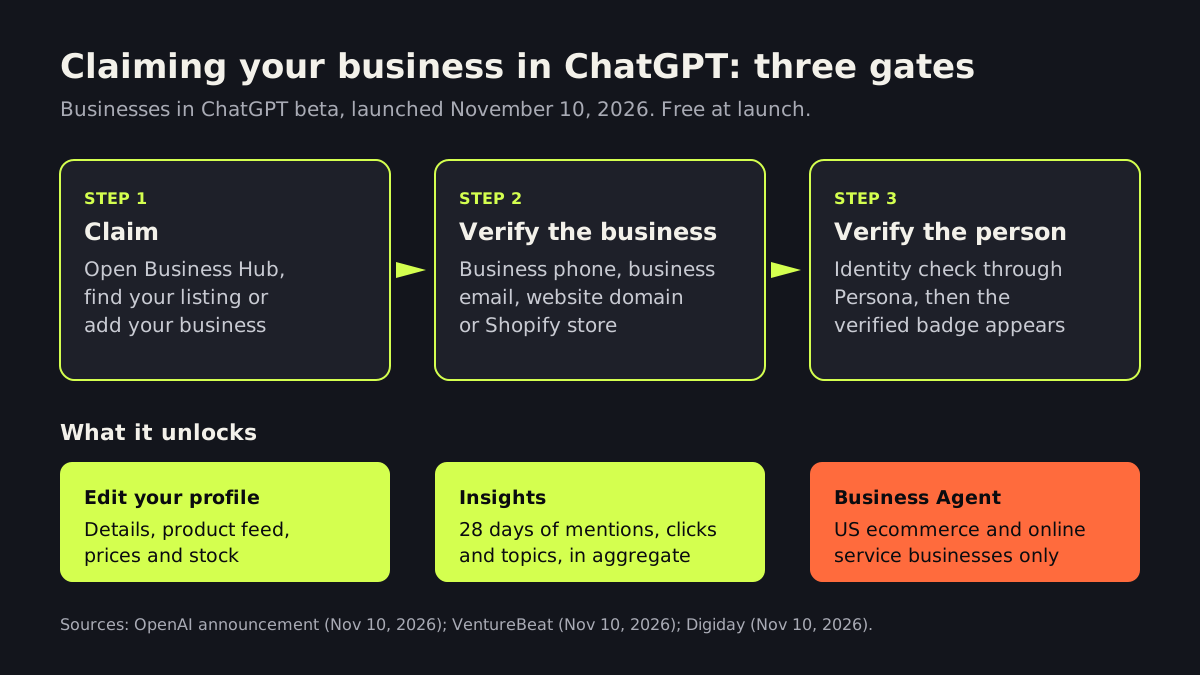
Short answerTo claim your business on ChatGPT, open Business Hub in ChatGPT, find or add your business, verify it with a business phone, business email, website domain or Shopify store, then pass an identity check. OpenAI launched this as a free beta on November 10, 2026. Claiming lets you correct your details and see aggregate insights. Eligible US ecommerce and online service businesses can also publish a Business Agent that answers shoppers' questions. OpenAI says claiming does not guarantee better placement, so treat it as accuracy insurance, not an ad.

What did OpenAI launch this week?
On November 10, 2026, OpenAI opened a beta called Businesses in ChatGPT. Its official announcement describes three pieces:
- Business Hub: a place to claim your business listing, manage the information ChatGPT shows about you, and add product feeds with current prices and availability.
- Insights: aggregate numbers on how often you are mentioned, how many people click through to your website, and which topics come up in conversations where you are cited.
- Business Agents: a branded assistant that answers questions about your products and policies inside ChatGPT. At launch it is limited to eligible ecommerce and online service businesses in the US.
VentureBeat (November 10, 2026) reports that OpenAI cites 1.2 billion weekly ChatGPT users, and that conversations with a Business Agent are labeled so people know they have moved from ChatGPT's own answers to a seller's agent.
Here is a simple way to picture it. ChatGPT is like a well-read hotel concierge. Guests ask where to eat, and the concierge recommends places from everything they have read. Until now you had no way to hand the concierge your current menu and hours. Business Hub is that handoff. It does not pay the concierge to send guests your way, but it makes it less likely they send someone to the wrong address.
How do you claim your business on ChatGPT, step by step?
Based on OpenAI's setup guidance as reported by VentureBeat, the process looks like this:
- Log in to ChatGPT with the work account you want to manage the listing.
- Open Business Hub, search for your business name and select it, or type it in if it is not listed.
- Click "Get Started" and confirm which account will be the administrator.
- Verify the business. OpenAI may use a business phone number, business email, website domain or a Shopify account.
- Pass an identity check through Persona. Until you do, you cannot publish profile changes, connect a product feed, view insights or create an agent. A verified badge appears once that check is approved.
Two details matter for small businesses. You do not need a ChatGPT Enterprise agreement or an ads account to claim a listing. And local businesses such as stores and restaurants can currently claim only an existing US listing, so if ChatGPT does not already know about your shop, you may have to wait.
It is an early beta. In OpenAI's own community thread, some owners report verification problems, such as a short window to complete the website domain check. Set aside time, and have whoever manages your domain records on hand.
What can a ChatGPT Business Agent do, and who qualifies?
A Business Agent is a chat that speaks for your brand when someone in ChatGPT asks about your products. You supply the information and the guidelines, and you can upload a product feed with prices and stock levels or connect a Shopify store. VentureBeat reports that Shopify merchants can build the agent from their existing catalog and test its answers before publishing.
You do not get to plug in your own bot. OpenAI's VP of monetization, Benji Shomair, told Digiday (November 10, 2026), "We aren't allowing folks to bring their own agents." OpenAI builds the agent from your instructions and feed. When a shopper is ready to buy, the agent sends them to your own website to complete the purchase.
Eligibility is narrow for now: US ecommerce and online service businesses with a website. If you run a dental office, a plumbing company or a law firm, you can likely claim a listing but not publish an agent yet. Shomair declined to give a timeline for wider rollout.
Does it cost anything, and will it improve your ranking?
It is free at launch. Digiday reports that Business Hub and Business Agents are free for now, and that Shomair did not rule out charging later.
The bigger question is whether claiming helps you appear more often. OpenAI's answer is no, at least not directly. VentureBeat reports that OpenAI says ChatGPT keeps making independent recommendations and that claiming does not guarantee better placement or sales. Shomair told Digiday that taking part should not change how often a business appears, while adding that better information can help ChatGPT surface you in more relevant conversations.
There is a paid side, too. Digiday reported that OpenAI began testing a paid "sponsored agent" ad format in September, and Shomair described the free agent as "the organic experience." Expect the free and paid tools to keep moving closer together, much as they did with search ads. Our earlier piece on Google ads in AI Mode shows the same pattern at Google.
What will you see in the insights, and what stays private?
Insights are aggregate only. VentureBeat says the dashboard shows 28 days of data: website clicks, mentions and recurring topics. Digiday adds that views are included, and that small counts may be hidden for privacy. Some points to keep in mind when you read the numbers:
- An online business gets a mention when ChatGPT references its website. A local business gets one when its location appears in a result. Your brand name alone does not count.
- A website click is a click on a link in ChatGPT, not a confirmed visit or a sale.
- You will not see individual prompts or chats. OpenAI's announcement says it does not share people's conversations or Business Agent chats with businesses.
So treat Insights as a trend line, not an attribution report. Pair it with your own website analytics and your call and form tracking.
What should you do this week?
- Ask ChatGPT about yourself. Ask the questions your customers ask, such as "best [your service] near [your city]," and note what it gets right and wrong.
- Claim your listing. Pick one owner or manager as the administrator, and use a work account, not a personal one.
- Fix your sources first. ChatGPT learns about you from the web. Make sure your website, hours, services and prices are current and consistent everywhere they appear. If you have edited your robots.txt for AI, our guide to the AI training opt-out explains how training and AI search answers are handled differently.
- If you sell online in the US, draft before you publish. Write down the questions the agent may answer, the ones it must never answer (refunds, medical or legal advice, custom quotes), and test it with tricky questions. Our article on whether AI agents are safe for small businesses covers the safe ways to start.
- Set a monthly check. Put 15 minutes on the calendar to review Insights and your own analytics side by side.
None of this replaces your own website. A shopper who clicks through still lands on your pages, and a fast, clear site with an assistant that answers from approved content is what turns that click into a customer. Our web development team builds sites that AI tools can read clearly, and our AI chatbot development service builds assistants for your own site that hand off to a person when needed. If you want help deciding what to set up in ChatGPT and what to keep on your own channels, book a free AI strategy call.
Frequently asked questions
Is it free to claim my business on ChatGPT?
Yes, during the beta that started on November 10, 2026. Business Hub and Business Agents are free at launch, and OpenAI has not ruled out charging in the future.
Can a local business like a dentist or plumber use a ChatGPT Business Agent?
Not yet. At launch, Business Agents are limited to eligible US ecommerce and online service businesses. Local stores and restaurants can claim an existing US listing and correct their details, but cannot publish an agent for now.
Will claiming my business make ChatGPT recommend me more?
OpenAI says claiming does not guarantee better placement or more sales, and ChatGPT keeps making independent recommendations. Accurate information may help it show you in more relevant conversations, so the main benefit is getting your details right.
Sources
- official announcement — community.openai.com
- VentureBeat — venturebeat.com
- Digiday — digiday.com
Written and reviewed by the INTELVYRA team. Prices and figures were checked on the date above and can change. Always confirm current pricing with each provider.