AI Guides · 7 min read
What is AI orchestration, and what are its common use cases for small businesses?
Short answerAI orchestration means coordinating AI models, your business tools and a human check so a multi-step job runs from start to finish. IBM defines it as the coordination and management of AI models, systems and integrations. For a small business that usually looks like one well-designed workflow: an inquiry comes in, AI reads and sorts it, your CRM is updated, a reply is drafted, and a person approves anything unusual. You do not need a big platform or a fleet of agents to start.

What is AI orchestration in plain English?
Picture a busy restaurant kitchen. Each cook is good at one station: grill, salads, desserts. Nothing leaves the pass until the expediter has checked it, and the expediter decides which ticket goes where and when. The cooks are your tools and AI models. The expediter is orchestration.
IBM's explainer (published January 23, 2025) splits it into three parts. Integration connects your AI tools, data and apps. Automation runs the steps with little manual effort. Management covers oversight: security, reporting and who is allowed to do what. The third part is the one small businesses tend to skip, and it is the one that keeps a system trustworthy.
How is it different from a chatbot or a simple automation?
The lines blur, but a rough guide helps:
- A chatbot answers questions in a conversation.
- A simple automation does one thing when something happens: a form is submitted, so a row is added to a spreadsheet.
- Orchestration links several steps, sometimes with an AI model making a judgment call in the middle, and decides what happens next, including when to hand off to a person.
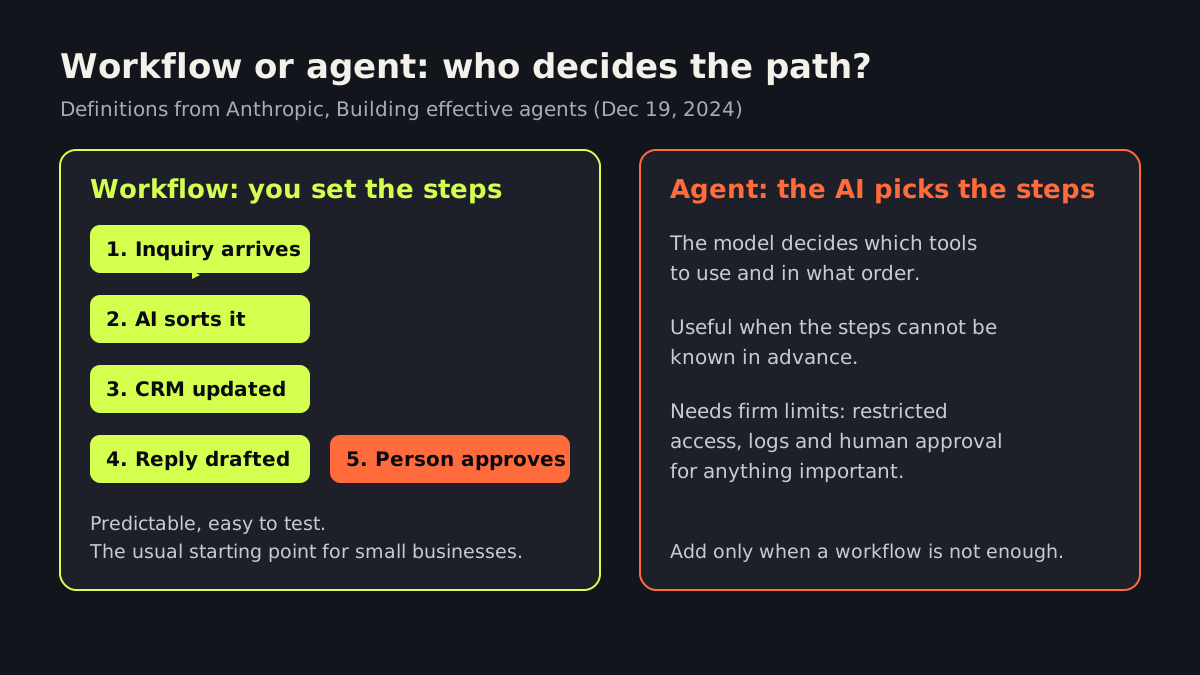
Anthropic's engineering team draws a useful line in its guide Building effective agents (December 19, 2024). In a workflow, AI models and tools follow a path you defined in advance. In an agent, the AI decides its own steps and which tools to use. Most small-business jobs are better served by a workflow, because you can predict and test it.
What are the most common use cases for small businesses?
These six are illustrative examples of where orchestration fits. They are not client results, and the right mix depends on your business.
- Lead intake and qualification. A web inquiry is read, tagged by service and urgency, added to the CRM, and answered with a draft reply. A person reviews anything unclear. See our guide to how fast to respond to a lead.
- Missed-call follow-up. A missed call triggers a text or call-back task, and the details land in the CRM. Our article on what missed calls cost a small business covers why this matters.
- Appointment and quote requests. AI collects the details, checks them against your rules, and books or proposes a time. Unusual requests go to a person.
- Support triage. Incoming emails are sorted into categories, simple questions get a drafted answer from your approved information, and complaints are routed to a human the same day.
- Document and invoice intake. AI extracts fields from forms or invoices, and a person approves before anything is paid or filed.
- Weekly reporting. Numbers from several tools are pulled into one summary with plain-English notes, so you see what changed without opening five dashboards.
More examples are in AI automation examples for small businesses.
Are other small businesses already doing this?
Yes, but adoption is still early. A Minneapolis Fed article (May 29, 2026), drawing on Census Bureau survey data, reports that about 20% of US firms used AI in early 2026 after the survey question was broadened. In an April 2026 supplement, 17% of firms with fewer than 20 employees used AI, and about 15% of firms used it in sales and marketing. So most of your competitors are still deciding where to start.
Do you need an AI agent, or is a workflow enough?
For most small businesses, a workflow is enough. Anthropic's guide recommends finding “the simplest solution possible” and adding complexity only when needed. It lists a few building blocks that show up in real systems: prompt chaining (one step feeds the next), routing (sort an input and send it to the right handler), parallelization (run checks side by side), orchestrator-workers (one model breaks a task up and delegates) and evaluator-optimizer (one model drafts, another critiques).
Chaining and routing, plus a human approval step, cover most of the six use cases above. When a task is open-ended and the steps cannot be known in advance, an agent may make sense, but it needs firm limits. Our guide on using AI agents safely in a small business explains the safeguards.
What should you do this week?
- Pick one job with a clear start and finish, such as handling a new inquiry.
- Write the steps on paper, including who does each one today and how long it takes.
- Mark the checkpoints. Anything involving money, medical, legal or an angry customer should have a human approval.
- Count the volume. Ten a month is a different project from ten a day.
- Decide who owns it. Someone must watch the results for the first month.
If you would rather have someone design and test it with you, our AI integration services and business process automation work starts exactly this way: one workflow, clear checkpoints, tested before it touches customers. Book a free AI strategy call and we will help you choose the first one.
Frequently asked questions
Is AI orchestration only for large companies?
No. The idea is just coordinating several steps and tools with some AI judgment and human review. A small business can start with a single workflow, such as handling a new inquiry, without buying an enterprise platform.
What is the difference between a workflow and an AI agent?
Anthropic defines workflows as systems where models and tools follow predefined code paths, and agents as systems where the model directs its own process and tool use. Workflows are easier to test and predict, so they are the usual starting point.
How do I keep AI orchestration safe?
Limit what each step can access, keep a human approval step for anything involving money, legal or medical matters, log what happens, and test with realistic examples before customers see it. IBM lists oversight, security and reporting as one of the three parts of orchestration.
Sources
- explainer — www.ibm.com
- Building effective agents — www.anthropic.com
- Minneapolis Fed article — www.minneapolisfed.org
Written and reviewed by the INTELVYRA team. Prices and figures were checked on the date above and can change. Always confirm current pricing with each provider.