AI Guides · 7 min read
Should a small business use Zapier or hire an AI automation consultant?
Short answerBuild it yourself with Zapier, Make or n8n when the job is a simple, low-risk trigger and action, such as a new form entry becoming a spreadsheet row. Hire an AI automation consultant when the workflow touches customers or money, links several systems, relies on AI judgment that needs testing, or would take you longer to build and maintain than the scoped fee costs. The tools are cheap: Zapier's Professional plan was $19.99 a month billed annually for 750 tasks on June 16, 2026. The real cost is your time.

What do the do-it-yourself tools actually cost?
Entry prices are low, which is why most owners try them first. Figures below come from each vendor's own pages and can change, so check before you buy.
- Zapier (pricing page, June 16, 2026): Free gives 100 tasks a month. Professional is $19.99 a month billed annually for 750 tasks. Team is $69 a month billed annually. A task is an action your automation successfully completes, and filters, paths and the formatter do not count. Zapier's AI step uses 1 task on the default model, 3 on an advanced one and 5 on a premium one.
- n8n Cloud (pricing page, viewed November 15, 2026): Starter is €20 a month billed annually for 2,500 workflow executions, and Pro is €50 a month billed annually for 10,000.
- Make (plan changes effective November 6, 2025): usage is measured in credits, Core includes up to 300,000 credits a month, and extra credits cost 25% more than those included in your plan.
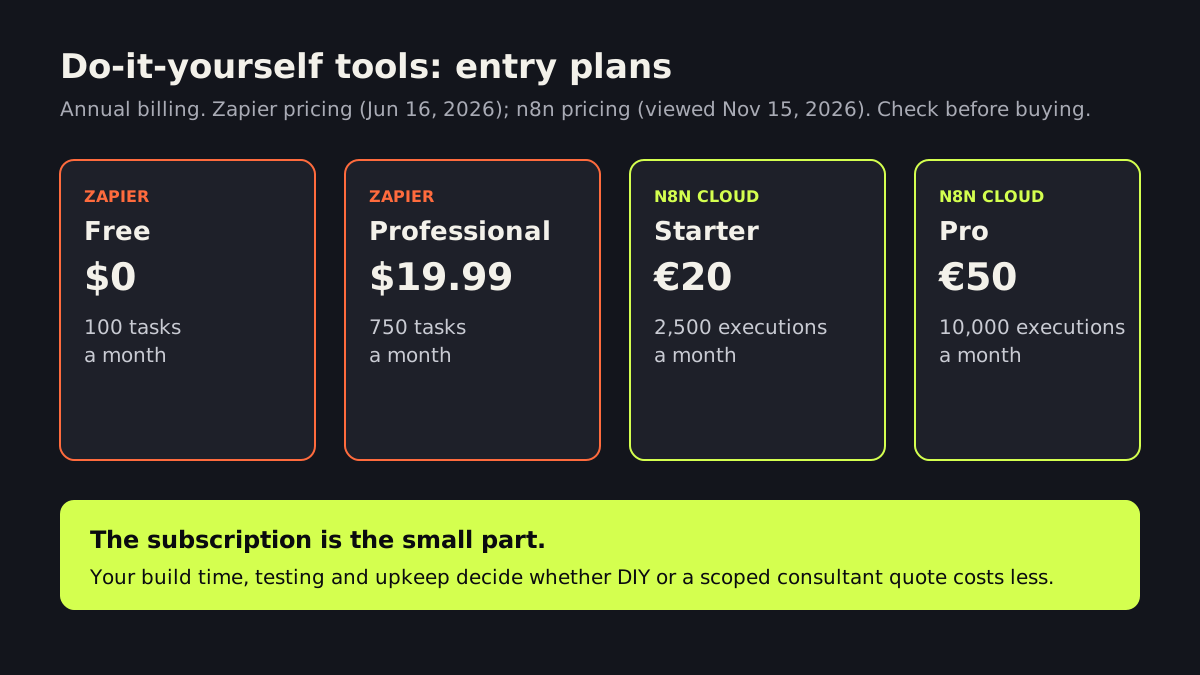
Usage is where surprises hide. As an illustration, if a Zap has five action steps and runs 200 times a month, and each completed action counts as a task, that is about 1,000 tasks, more than the 750 in Professional. Add AI steps and the count climbs faster.
When is doing it yourself the right call?
DIY works well when most of these are true:
- The workflow has one trigger and two or three steps.
- A mistake is cheap and obvious, such as a wrong row in an internal sheet.
- No customer ever sees the output without you checking it.
- You enjoy tinkering and can fix it when an app changes its settings.
Our guide on which business tasks to automate first lists good starter jobs. Learning the tool on a low-stakes task also makes you a better buyer later.
When does a consultant make more sense?
- Customers are involved. Replies, bookings or quotes that go out under your name need testing and a safety net.
- Money or sensitive data moves. Invoices, payments, health or legal information call for access limits and logs.
- Several systems must agree. A CRM, calendar, phone system and accounting tool rarely line up neatly without careful mapping.
- AI makes judgment calls. Sorting leads or drafting answers needs real examples, review and a plan for when the AI is wrong. Our article on using AI agents safely covers this.
- Someone has to keep it running. Automations break quietly when a form field changes. Monitoring matters.
- Your time is the scarce thing. Weekends spent debugging are not free.
What does a consultant cost, and what should the quote include?
We could not find a public price benchmark for small-business AI automation that we would stand behind, and rates vary widely, so we will not quote a made-up range. Instead, ask for a fixed, scoped quote and check that it names:
- The exact workflow and what “done” looks like.
- Testing with your real examples, including failure cases.
- Where a person approves or takes over.
- Who owns the accounts and logins. They should be yours.
- Ongoing costs: tool subscriptions, AI usage fees and any monthly support.
- Documentation, so someone else could maintain it.
Our pricing page explains how we scope work. Our guide to what AI costs a small business breaks the costs down further.
Is there a middle path?
Often, yes. You open the Zapier, Make or n8n account and pay the subscription directly. A consultant designs and tests the workflow inside your account, hands you the documentation, and steps back. You keep control, and the build is done by someone who has seen the failure cases. For the CRM side, see CRM automation for small businesses.
What should you do this week?
- List three tasks you want to automate and note how many times each happens a month.
- Mark each one as customer-facing, money-related or internal only.
- Build the internal-only one yourself on a free plan.
- For the other two, write down the steps and ask for a scoped quote.
If you want a second opinion on which is which, our business process automation team offers a free AI strategy call, and the answer is sometimes “do this one yourself.”
Frequently asked questions
Is Zapier free for small businesses?
Zapier has a free plan with 100 tasks a month, according to its pricing page dated June 16, 2026. Paid plans start with Professional at $19.99 a month billed annually for 750 tasks. If a workflow runs often or has many steps, you can pass those limits quickly.
Can I automate my business with AI without a consultant?
Yes, for simple internal jobs. Customer-facing workflows, money, sensitive data and multi-system builds are where a mistake costs more, so testing and a human approval step become important.
What should I own if I hire an automation consultant?
You should own the accounts, logins and data, and receive documentation of how the workflow runs. That way you can change providers or maintain it yourself later.
Sources
- pricing page, June 16, 2026 — zapier.com
- pricing page, viewed November 15, 2026 — n8n.io
- plan changes effective November 6, 2025 — help.make.com
Written and reviewed by the INTELVYRA team. Prices and figures were checked on the date above and can change. Always confirm current pricing with each provider.