Automation · 7 min read
How do you automate invoice follow-up without annoying customers?
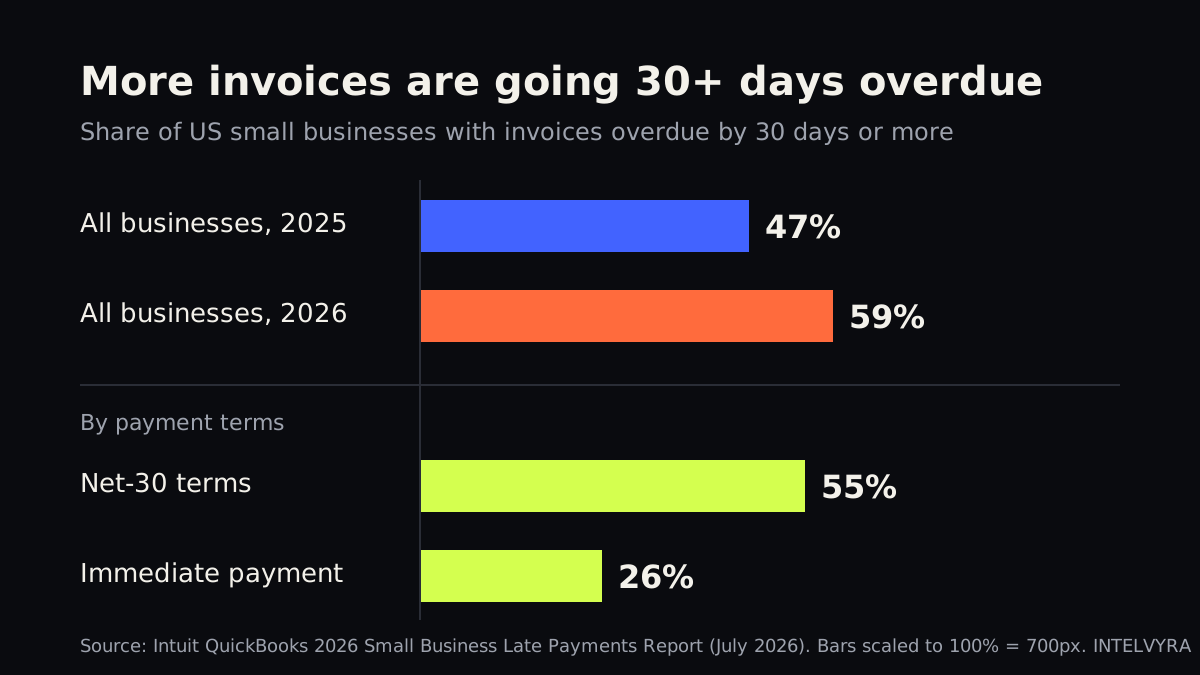
Short answerTo automate invoice follow-up, connect your accounting or invoicing tool to a reminder schedule: a friendly note a few days before the due date, then reminders at set points after it, each with a one-click payment link. The sequence stops the moment the invoice is paid, and anything unusual, such as a dispute or a large balance past 30 days, is handed to a person. It matters now: Intuit QuickBooks (July 2026) found 59% of US small businesses have invoices more than 30 days overdue, up from 47% a year earlier.

Why is chasing unpaid invoices getting harder in 2026?
Because more customers are paying late, and many owners still chase them by hand. In its 2026 Small Business Late Payments Report (July 2026), Intuit QuickBooks found that 59% of businesses had invoices overdue by 30 days or more, up from 47% the year before. More than one in five (22%) had at least a fifth of their invoices in that state. Businesses with unpaid invoices were owed $17.7K on average.
The damage is out of proportion to the amounts. In the same report, 39% said a single late payment made it hard to cover payroll or bills in the past year, and 27% said a missed payment under $5,000 caused real strain. Businesses with overdue invoices were also far more likely to report cash-flow problems (51% vs 36%).
The problem is not new. The Federal Reserve's Small Business Credit Survey report on payments (December 5, 2024) found that roughly four in five small firms face payments-related challenges, and that firms in professional services, real estate and manufacturing are more likely to name slow-paying customers as one of them. If you bill after the work is done, you are in the group that feels this most.
The national averages look calmer than many owners feel. Xero's data shows US small businesses waited an average of 29.3 days to be paid in the June 2026 quarter, with late payments averaging 8.5 days (Xero, August 20, 2026). An average hides the long tail, though: a few invoices that drift to 60 or 90 days do most of the harm.
Why does manual follow-up break down?
Most owners know they should send a reminder. The trouble is that chasing money is uncomfortable, easy to postpone and nobody's main job. A typical pattern looks like this (illustrative):
- The invoice goes out, and nobody looks at it again until cash is tight.
- The first reminder is sent weeks late, by whoever has a spare minute, in whatever tone they are in that day.
- Someone emails a customer who already paid, because the payment was not matched yet. That is the reminder customers remember.
- Large, old balances get the same treatment as a small invoice that is two days late.
The QuickBooks report points the same way. It found 74% of businesses are not fully automated for managing and paying bills, and that manual processes were the top internal cause of delayed outgoing payments. Owners also seem ready for help: 40% named bill payment reminders as an area where they see AI potential, and 26% said their most useful digital tools help them chase and collect overdue invoices faster.
What does an automated invoice follow-up system actually do?
Think of how a good dental office handles checkups. You get a reminder card before the visit, a text the day before, and a call only if you miss it. Nobody at the front desk has to remember you, the tone is always friendly, and a person gets involved only when the routine does not work. Automated invoice follow-up runs on the same idea.
In practice, a solid setup has five parts:
- A trigger. Each invoice sent from your accounting or invoicing tool starts its own reminder schedule.
- A sequence. Short, polite messages at planned points, by email and, where the customer agreed to it, by text.
- A payment link in every message. The easier it is to pay, the less there is to chase.
- A stop rule. The sequence ends the instant a payment is recorded, or pauses when a customer replies or raises a dispute.
- A handoff. When an invoice crosses a line you choose (for example, 30 days late or over a set amount), the system creates a task for a person with the full history attached.
AI helps at the edges rather than the core. It can sort replies (“paid already,” “need a copy,” “question about the charge”), draft a response for a person to approve, and match incoming payments to the right invoice. The schedule itself should stay simple and rule-based, so you always know what was sent and why. This is a good fit for business process automation, and it is one of the tasks we suggest in our guide to which business tasks to automate first.
What should a good reminder schedule look like?
There is no single correct schedule, and it should fit your payment terms and customers. Here is a reasonable starting point to adjust (illustrative):
| When | Message | Who handles it |
|---|---|---|
| 3 days before due | Friendly heads-up with the amount, due date and payment link | Automatic |
| Due date | “Due today” note with the link | Automatic |
| 7 days late | Polite reminder, copy of the invoice attached | Automatic |
| 14 days late | Firmer reminder that mentions your terms and asks if anything is wrong | Automatic |
| 30 days late | Phone call or personal email | A person, with the history in front of them |
Two adjustments usually matter more than the exact days. First, look at your terms. QuickBooks found 55% of businesses on net-30 terms had overdue invoices, compared with 26% of those asking for immediate payment. Shorter terms or a deposit for new customers can do more than any reminder.
Second, segment your customers. A long-term client who always pays on day 35 does not need the same tone as a new account that has gone quiet. Most tools let you run different sequences for different groups, or skip reminders for a customer you are already talking to.
Are there rules to watch when you automate payment reminders?
A business collecting its own invoices is usually not treated as a “debt collector” under the federal Fair Debt Collection Practices Act. But there is a catch: the FTC has pointed out that a creditor that collects using any name other than its own, in a way that suggests a third party is collecting, can fall under the law (FTC business blog, December 8, 2015). So send reminders in your own business name, never from a made-up “collections department.”
A few other common-sense rules keep you out of trouble:
- Text customers only if they agreed to receive texts from you, and honor “stop” requests. Our article on missed-call text back rules covers consent basics.
- Keep the tone factual. No threats, no false deadlines.
- State laws vary, so if you plan to hand accounts to an agency or add late fees, check with your attorney or accountant first. This article is not legal advice.
What can you do this week?
- Pull an aging report. List every open invoice by days overdue. Note how many are past 30 days and what they add up to.
- Turn on the basics. Most invoicing and accounting tools include a payment link and simple reminders. Switch them on, and rewrite the default wording so it sounds like you.
- Write your handoff rule. Decide the point where a person takes over (for example, 30 days late or over $2,500) and who that person is.
- Review your terms. Consider shorter terms or a deposit for new customers, and make sure the due date is easy to see on every invoice.
- Check the matching. Make sure payments are recorded promptly, so nobody gets a reminder for a bill they already paid.
If your invoices, CRM and payment tools do not talk to each other, that is where a custom setup earns its keep: payments matched automatically, replies sorted, and a weekly receivables view on an AI business dashboard so you see late money before it becomes a payroll problem. If you already track deals in a CRM, our guide to CRM automation for small business shows how paid invoices can update your pipeline too.
Want help mapping your billing process and deciding what to automate first? Book a free AI strategy call with INTELVYRA, and we will look at it with you.
Frequently asked questions
Will automated payment reminders annoy my customers?
Not if they are polite, well timed and stop the moment the invoice is paid. Most complaints come from reminders sent for bills already paid, so make sure payments are recorded and matched quickly before you switch reminders on.
How many reminders should I send for an overdue invoice?
A common starting point is one before the due date, one on the due date and two or three after it, with a person stepping in around 30 days late. Adjust it to your payment terms and to how each customer usually pays.
Can AI chase invoices without a person involved?
AI can sort replies, draft answers and match payments, but a person should handle disputes, payment plans and large overdue balances. Keep the reminder schedule rule-based so you always know what was sent and why.
Sources
- 2026 Small Business Late Payments Report (July 2026) — quickbooks.intuit.com
- Small Business Credit Survey report on payments (December 5, 2024) — www.fedsmallbusiness.org
- Xero, August 20, 2026 — www.xero.com
- FTC business blog, December 8, 2015 — www.ftc.gov
Written and reviewed by the INTELVYRA team. Prices and figures were checked on the date above and can change. Always confirm current pricing with each provider.