Customer Service · 7 min read
How do you reduce a customer support backlog without hiring more staff?
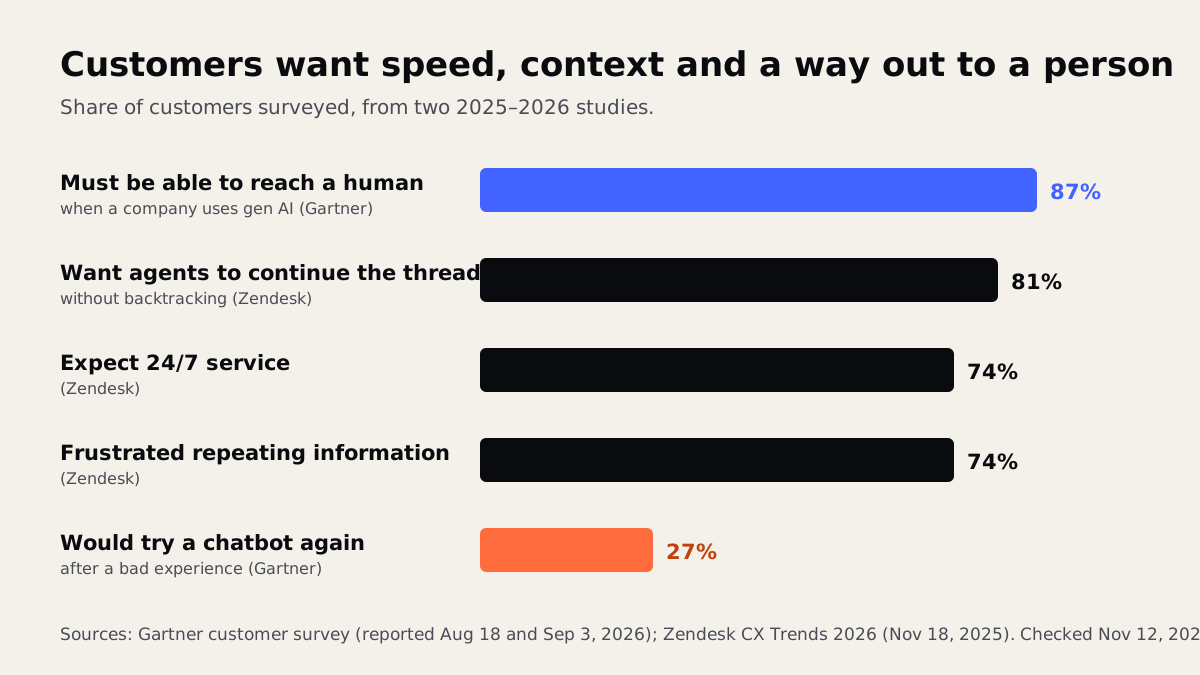
Short answerTo reduce a customer support backlog, sort what is waiting before you answer anything: urgent, simple and complex. Then let automation or an AI assistant handle the simple, repeated questions from approved answers, and keep your people for the complex and upset customers, with an easy way to reach a human at every step. In a Gartner survey reported in August 2026, 87% of customers said companies using generative AI for service must offer access to a human agent, so that handoff is not optional.

Why does a support backlog keep growing?
A backlog rarely starts with a disaster. It starts with a busy Monday. A few emails wait until Tuesday, customers who heard nothing send a second message, and someone calls to ask about the email. Now one question has become three, and your team answers the newest message first because it is on top.
The usual causes in a small business are simple:
- Everything lands in one shared inbox with no labels, so a refund request and a "what time do you close?" look the same.
- The same questions arrive every day (order status, hours, pricing, rescheduling), and each one is typed out by hand.
- Answers live in people's heads, so only one person can handle certain topics.
- Follow-ups are duplicates. Customers who wait chase, and each chase is another ticket.
Customers notice. Zendesk's CX Trends 2026 release (November 18, 2025, based on surveys of more than 11,000 people fielded in June 2025) found that 74% of consumers now expect 24/7 service and 74% are frustrated when they have to repeat information. In the same research, 85% of CX leaders said customers will drop brands that can't resolve issues on first contact.
What should you fix first: speed, volume or process?
Process, because it makes the other two possible. Think of an emergency room. A good ER does not see patients in the order they walked in. A triage nurse at the door sorts them: a sprained ankle waits, chest pain goes straight in, and a lot of people are sent to the pharmacy with a quick answer. Your inbox needs the same nurse.
Start by sorting what is already waiting into three piles:
- Urgent: money, safety, a cancelled job, an angry repeat customer. A person answers these today.
- Simple and repeated: questions with one correct answer you have given many times. These are your automation candidates.
- Complex: anything that needs judgment, an exception or a look at the account.
Then merge duplicates, so a customer who wrote three times gets one reply. Most teams find the backlog is smaller than it looked once the chasers are combined. If you are not sure which tasks to hand to software, our guide to which business tasks to automate first walks through how to choose.
Which support questions can AI answer safely?
The safe ones share three traits: the answer is written down, it is the same for everyone, and a wrong answer would not cost the customer money. Typical examples:
- Hours, location, service area and what you do or do not offer.
- Order or appointment status, when the AI can read it from your system.
- Booking, rescheduling and simple intake forms.
- How-to steps that already exist in your help pages.
Leave refunds, complaints, billing disputes, legal or medical questions and anything emotional with a person. The US Consumer Financial Protection Bureau's report on chatbots (June 6, 2023) is a useful warning list even outside banking: it describes customers stuck in "doom loops" of unhelpful replies, bots that fail to recognize a dispute, and notes that "chatbots sometimes get the answer wrong."
That is why we build assistants that answer only from approved content and pass anything else to your team. Our article on AI chatbots for customer service covers what they can and can't do in more detail.
How do you keep a human in the loop?
Customers are open to AI help, but on their terms. In the Gartner survey reported by destinationCRM (August 18, 2026), half of customers said interactions are easier when companies use generative AI, and 87% said there must be an option to reach a human. Gartner analyst Eric Keller advised against making AI a mandatory first step for every issue.
A bad first try is expensive. A separate Gartner finding, reported by Renascence (September 3, 2026), is that only 27% of customers would try a chatbot again after a negative experience. In practice, a good handoff means:
- A visible "talk to a person" option from the first message, not after five failed attempts.
- Automatic handoff on trigger words like refund, cancel, complaint or lawyer, and whenever the AI is unsure.
- The full conversation passed to your team, so the customer never repeats themselves (the 74% frustration figure above).
- An honest promise: "A person will reply by 2 p.m. tomorrow," and then keep it.
Which numbers tell you the backlog is shrinking?
You do not need a full analytics team. Track four numbers each week, ideally on one simple dashboard:
| Metric | What it tells you |
|---|---|
| Open requests at end of week | Is the pile growing or shrinking? |
| Oldest unanswered request | Is anyone being forgotten? |
| Time to first reply | How long customers wait before hearing anything |
| Share resolved without a handoff | Whether automation is actually helping, or just deflecting |
Watch the last one carefully. A bot that "closes" tickets by sending customers in circles makes the number look good while customers leave. Pair it with a one-question survey or a look at reopened requests. Fast first replies matter for sales too; our piece on lead response time explains why waiting costs more than it seems.
What to do this week
- Count the pile. Write down how many requests are open and how old the oldest one is. That is your starting point.
- Triage in one sitting. Sort everything into urgent, simple and complex, and merge duplicates. Answer the urgent ones first.
- List your top ten questions. Look through the last month of email and messages and note which questions repeat most.
- Write approved answers. One short, correct answer for each of the ten. This list helps your staff today, and it becomes the knowledge base for any AI tool later.
- Set a reply promise. Pick a realistic first-reply time, add it to your auto-acknowledgment email and your website, and stick to it.
- Decide your handoff rules. Write down which topics always go to a person.
Once those basics are in place, the automation part is much easier and safer. Our AI chatbot development service builds assistants that answer from your approved content and hand off to your team with the full conversation, and our business process automation work routes, labels and tracks requests so nothing sits forgotten. If you would like to talk through your own backlog, book a free AI strategy call and we will help you decide what is worth automating and what should stay human.
Frequently asked questions
What is a customer support backlog?
It is the set of customer requests that are open and waiting for a reply or a fix. A backlog grows when new requests arrive faster than your team resolves them, and follow-up messages from waiting customers make it grow faster.
Can an AI chatbot clear a support backlog on its own?
No. It can answer simple, repeated questions from approved content, which frees your team for the harder ones. Complaints, refunds and anything unusual should go to a person, and customers should always be able to reach one easily.
How fast should a small business reply to support emails?
There is no single rule. Pick a first-reply time your team can keep every day, state it in your auto-acknowledgment and on your website, and measure it weekly. A short honest promise you keep beats a fast one you miss.
Sources
- CX Trends 2026 release — www.zendesk.com
- report on chatbots — www.consumerfinance.gov
- destinationCRM — www.destinationcrm.com
- Renascence — www.renascence.io
Written and reviewed by the INTELVYRA team. Prices and figures were checked on the date above and can change. Always confirm current pricing with each provider.